Showing posts with label Journals. Show all posts

Monday, December 24, 2012

Web 2.0 and Social Media for Cardiologists - one-click solutions

I was preparing for my presentation at a major medical conference in India.  The presentation is on use of Social Media for Physicians.  The conference is focused on mostly cardiology topics for general internists.  The organizers asked me to make sure the talk was practical and could leave the attendees with some easy to follow take home points.

As always the challenge with a presentation is knowing your audience.  I did not have a good feel for this, not having attended this conference before.  I struggled to select the appropriate content for the presentation.  I needed to show them what was possible, and then what they could do to get started.

I decided to give them some highlights on using Google Reader to stay current with medical (cardiology) literature and use of Twitter to network with cardiologists and to get updates and insights.  To make it easy for them to get started I created

  • An OPML bundle of cardiology journal feeds and
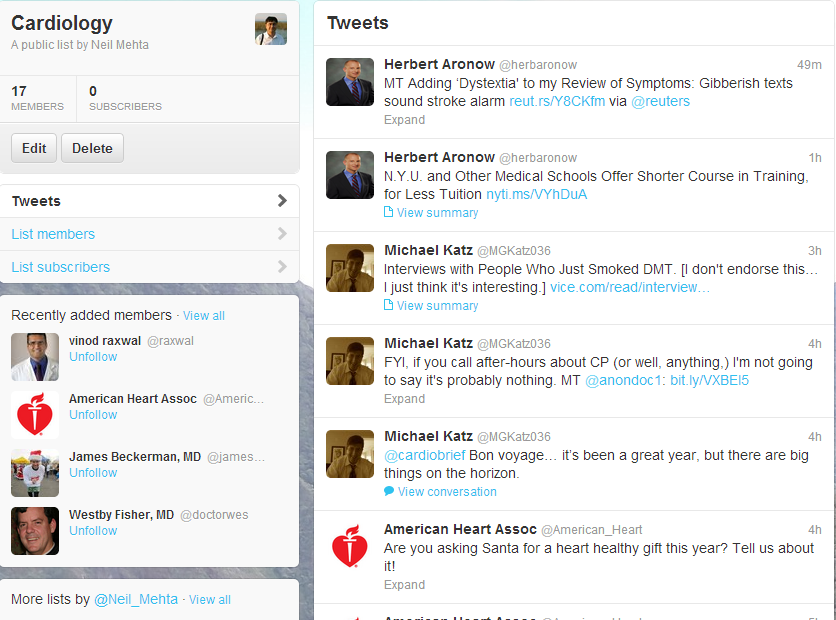
  • A Twitter list of cardiologists to follow - this post by Larry Husten was very helpful to get started.
Having gone through that effort, it is probably worthwhile to share these for others to use and share.

Getting your cardiology journals delivered to your "doorstep"
  • Get started with Google Reader
  • Then subscribe to 11 top cardiology journals and 3 blogs with one click.  (Click on subscribe)
  • Go to Google Reader and all 11 journal feeds should be available at one place.  These can be tagged and shared on Twitter, FB or Google+, Tumblr etc and also be searched!
RSS Feed Bundle or 11 top Cardiology Journals

Getting your cardiology fix on Twitter
Twitter List for Cardiology Updates

So there you are - 2 quick one-click solutions to introduce cardiologists into Web 2.0/Social Media.

Addendum:
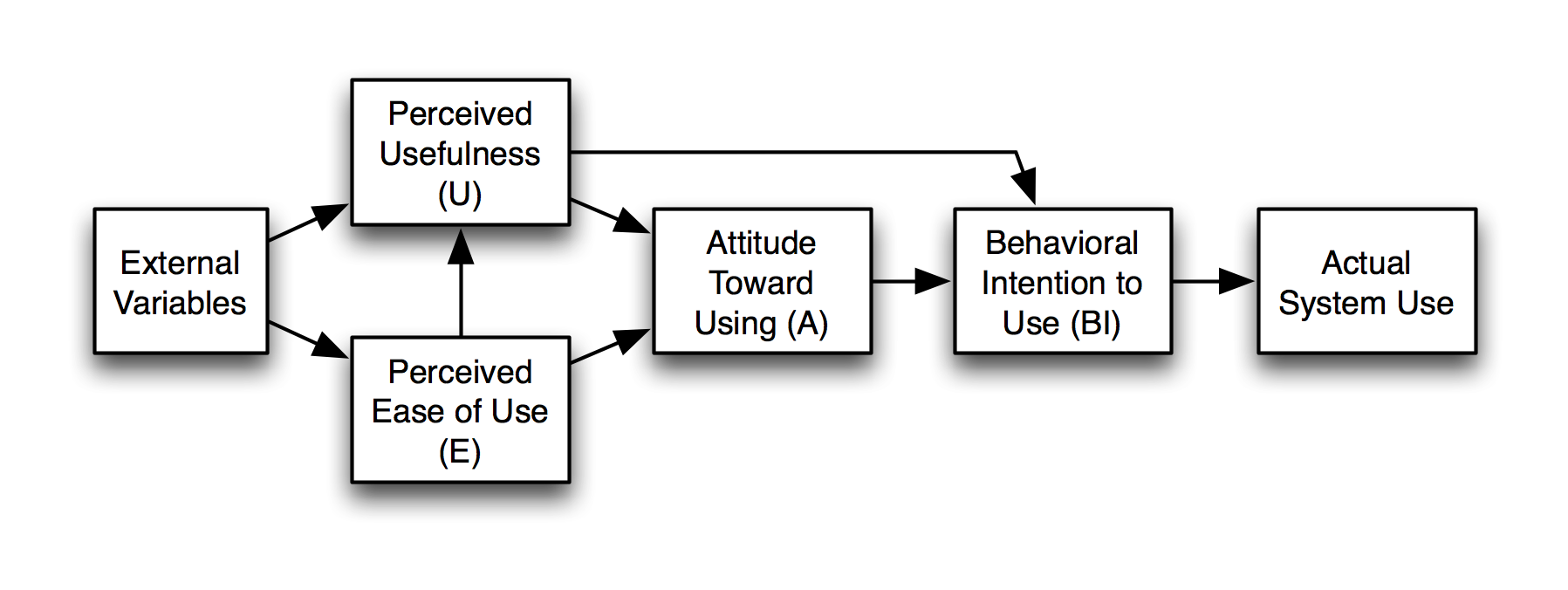
A conversation with @Allan Palmer on Google+ made me realize that this might have come across as a final solution for the attendees.  I need to stress that this is just the first step. There are several frameworks for understanding why some people are late to adopt IT innovations.  The Technology Adoption Model is based on:

  • Perceived Usefulness and 
  • Perceived Ease of Use

The Diffusion on Innovation theory by Rogers adds that an innovation must be easy to try, and its use should be visible to others (peers).  

Based on these frameworks, one would seek to provide late adopters an easy to use approach to try these tools, and allow them to see other colleagues using it.  Ideally one would add some hypothetical cases to illustrate the utility.

Thus for this conference, I could create an example of a patient on a statin who has questions about adding niacin to the regimen or a patient with history of coronary artery disease who is on a betablocker and getting severe fatigue from it.  These would lead to recent articles on these topics and conversations on Twitter and blog posts about these studies.

Saturday, October 20, 2012

Infographics: Can they make reading journals easier?

As we struggle with information overload and clinical overload, it is harder to keep up with updates in medical literature.  Several journals are trying to make it easier to scan articles and get the salient points quickly e.g. Annals of Internal Medicine provides a commentary summarizing the practical implications of a study.
My assumption is that most readers scan the abstracts of articles before deciding which ones to read in full.  Appropriate use of graphics can improve comprehension and possibly make this scanning process more efficient.  As the old saying goes "A picture is worth a thousand words".  Clearly graphics are very popular as can be seen by the popularity of Infographics and Pinterest.
So I decided to try out a free infographic creation tool Piktochart to create a visual representation of the salient points of a study.

I chose this study from JAMA - because it was the first study that caught my eye in my Google Reader stream after I thought of this idea.  So this is what the abstract looks like:


As you can imagine it took me a few minutes to get the main message of the study.  What if I had seen this infographic instead?  I took all the information from the study abstract.  The only thing I added was the Number Needed to Treat (NNT) that I calculated myself.  
Infographic Created by Neil Mehta
So what do you think?  Does an Infographic make it easier to scan journal articles?  If so, should journals have data visualization experts on their editorial team to help create these?  Should there be standards for creating these e.g. Blue circles for control groups and yellow for intervention groups, etc?


Saturday, April 21, 2012

Reading journal articles on tablets - Getting close to Nirvana?

Watch this video -
Why you ask?  What does it have to do with reading articles on tablets?
Just watch it, and it will all become clear at the end!  If you have the patience to read it all that is.


See 2 recent posts (1, 2) on issues with reading journal articles on tablets.
  • Most people want to read journal articles as PDFs
  • They may have more convenient access to full text articles at their institutions/work place
  • They want to read and annotate the articles on tablets while at home or travelling
  • They want to have these annotated articles available from anywhere
  • They want to be able to search for and cite these articles when writing papers/blogs etc.
The previous posts covered the first 3 issues listed above.  To close the loop it was important to get these annotated articles back into a searchable library from where they could be cited and for creating bibliographies.

So here is a workflow using a tool called Zotfile which is an extension for Zotero.

What you need
1.  Download Zotero (get standalone version with appropriate connector if you use Chrome or Safari).  The standard version works with Firefox.
2.  Download Dropbox and set up a folder where you would like to share articles between your desktop/s and tablet/s
3.  Download Zotfile
4.  Set up Zotfile to specify a folder where you usually download full text PDFs on your work place computer.
5.  Set up Zotfile to save files from Zotero to the folder mentioned in step 2.

Here is the workflow:

Workflow for sending PDFs to Tablet, and getting back Annotated PDFs from Tablet
 Steps:

  1. Learn about an article
    1. Feed reader
    2. From Social network
    3. While browsing/surfing
  2. Mark for download to Zotero
    1. On Google Reader - Star it, or tag it as Zotero
    2. Email link to it
    3. Bookmark it using Diigo - put in Zotero list
  3. On work computer, go to full text article and download to Zotero
    1. This is usually a one click by clicking on the address bar Zotero icon.
    2. This will usually grab the related PDF, and also all the metadata like title, journal, authors, abstract etc.
    3. You can add notes or tags
    4. The search engine works very very well
  4. Send article PDF to Tablet
    1. Right click on menu item>>manage attachment>> send to Tablet
    2. This will send the PDF to the Dropbox folder specified above
  5. Read and annotate article on Tablet
    1. Open file in Dropbox folder
    2. Open with EZPDF
    3. Annotate/Highlight/add notes
  6. Retrieve annotated article from Tablet
    1. On Zotero right click item >> manage attachment >> Get from Tablet
    2. The annotated article is saved in Zotero library
    3. The annotations are extracted and saved as a separate item
  7. Write and Cite
    1. This works like most other bibliography tools
    2. In addition, you can grab a bunch of citations and drag and drop into Google Docs.

So does this really work? I have tried it for a couple of days and it seems to work.  Here are some screenshots.

1. Once configured, ZotFile adds a "Send to Tablet" and "Get from Tablet" menu items to Zotero

Extracted annotations and highlights from the article linked to the citation
Article on Social Intelligence Hypothesis retrieved from Tablet
A quote from the article highlighted (Highlighting was done on Tablet)

 Why did I use this article as an example?  Remember the video you watched at the beginning of this post?
I had just read this article and was struggling to understand it.  The article mentions using the Prisoner Dilemma and I had meant to read up on it.  Then I saw a tweet by @courosa regarding this incredible video and it became very clear.

Thus it was in fresh in my mind as I was writing this blog post.


Sunday, April 15, 2012

Reading Journals in the Era of Tablets

I recently wrote a blog post on why readers don't use their tablets to read journal articles.  There were several possible reasons.

  1. Wanting to work with PDFs rather than HTML
  2. Difficulty annotating the PDFs on tablets (not knowing best tools for this)
  3. Hyperlinks may not work in PDFs
  4. Wanting to flip between a citation# in the text of the article and the reference in the bibliography.  This is easier to do on paper.
The workflow that might meet most of these needs (except #4 scroll to bottom for a work around for this):
Model workflow for annotating Journal PDFs on Tablets

  1. On you Desktop/Laptop
    1. Get table of contents and abstracts of Journals sent to my Google Reader via RSS feeds
    2. When you want, you get the full text of the article and save to Dropbox
    3. Journals are now increasing providing PDF with OCR which allows for highlighting.  If the PDF cannot be interpreted as text by the PDF reader, then the words cannot be highlighted, or the hyperlinks will not work.
  2. On your tablet
    1. Use EZPDF which is a full featured PDF reader and annotator.  It has some awesome features like:
      1. Highlighting
      2. Adding notes
      3. Drawing free text
      4. Adding arrows, circles or rectangles
      5. Night more (background becomes dark and font is white)
      6. Text to speech - actually reads the article for you.
    2. Go to Dropbox on you tablet and open the PDF with EZPDF
    3. Start reading and annotating (Long tap).  
    4. Choose not to make a copy of the article for annotation. Annotate the original in Dropbox. This will leave the annotated article in Dropbox as opposed to another folder on your tablet
This is a video of how to use EZPDF on an Android tablet.  There are more details on a blog here by Sleepless Ninja


The annotated PDFs are stored in Dropbox which has pros and cons.  This is good because the library automatically syncs with all your computers.  The negative is the inability to use this library to cite when writing an article or when creating bibliography.

The alternative work flow that supports citations and bibliography is to use something like Zotero.  Since Zotero introduced the standalone product that works with Chrome and Safari in addition to FireFox it has become even more attractive.  There is a tool called Zotfile that allows connecting your Zotero library to Dropbox and syncing with the tablet.
I have not explored Zotfile yet but I love Zotero so look out for an update in a future post.


Add:
If the journal does not have hyperlinked references in its PDF format, go to the HTML format and check if these are available.  If they are, then use Adobe Acrobat to create a PDF [File>>create PDF>>from web page>> enter URL
This will maintain all the hyperlinks that are in the HTML version.

Saturday, April 14, 2012

Academic Journals - will you read them on eReaders and Tablets?

I recently became involved in redesigning the web presence of a journal of a national academic medical society.  The company tasked with the web design process conducted a small number of interviews with current and potential journal readers.
They interviewed 3 people, with various backgrounds, training levels and interests in technology.

Some of the responses on these interviews were quite interesting and maybe surprising.  Here are two opinions that were quite unanimous.

1. Everyone wanted to have the ability to download articles as PDFs.
2. None of the respondents (wanted to) read the articles on a mobile device (even a large screen one like a tablet).

As I was pondering about this, I saw a piece about eBooks and whether they impact learning negatively. The article discusses how one uses one's visual memory to link information with its location in a text book and why this can help recall.  You can read the piece on time.com at http://healthland.time.com/2012/03/14/do-e-books-impair-memory/.
I had a great discussion on this article with some folks over on Google+.  The piece also has a nice video of how people use visual channels to remember information.


This morning I saw a presentation by Michael A Mabe,CEO of International Association of STM Publishers recorded at the UKSG 35th Annual Conference in Glasgow, March 2012.  I found a link to this talk on posts on Google+ by 2 folks who are thinkers and terrific curators on information in my areas of interest - Bertalan Mesko' and A.J. Cann. The presentation discusses what researchers and readers want in their academic publishing and why these needs have led to the current format of the print journal and why technology has not made much of a change in this format.


Just to make matters more interesting, I remembered reading a piece by Clay Shirky on Social reading.  I had saved it to my Evernote and I dug it up again. It is titled "How we will read" and you can find it here http://blog.findings.com/post/20527246081/how-we-will-read-clay-shirky. 

Clay talks about how when he used to read on the original Kindle it did not have e-mail to distract him.  He mentions Nick Carr and the use of Frost's quote as a book is a "momentary stay against confusion".  He talks wistfully of the times when he was bored and the importance of boredom as a way to recognize the 
gap between what you are interested in and your current environment.  But he moves on to discuss the benefits of annotating on his new Kindle and the value of social reading.

Maybe with evolution of the appropriate apps on mobile devices and as readers experience them, we will change our habits? Here is an image from @gtuckerkellog describing his workflow for reading his scientific literature on tablets.  TechCrunch has an article about how Netizine might be a solution.

Where did I read the Clay Shirky interview?  On Evernote app on my Motorola Xoom of course!